



Quick Top-Ups. Seamless Communication

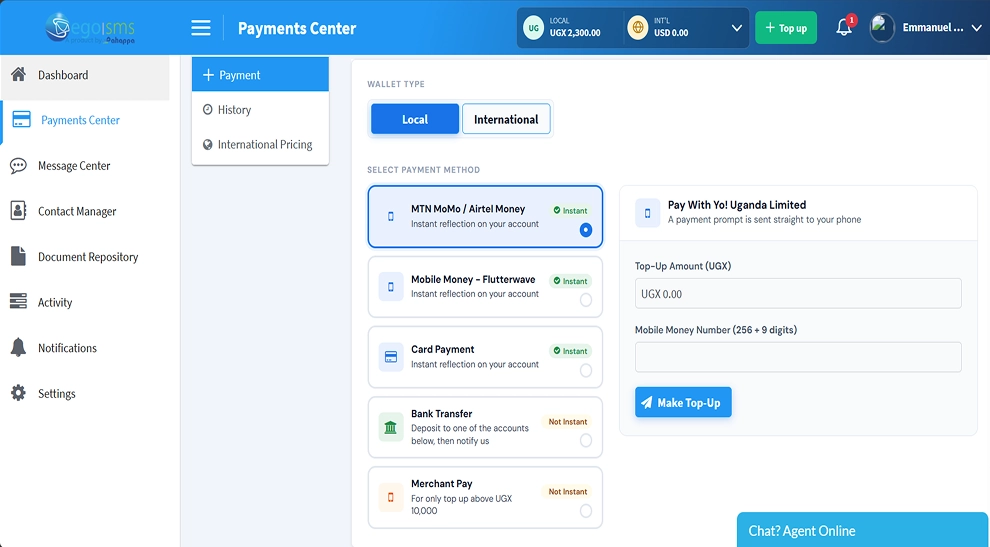
Easily top up your EgoSms wallet using your preferred payment method. Enjoy fast payments, flexible options, and simple wallet management to keep your business commuonication running smoothly.


Top Up Your Wallet


Payment Capabilities

Flexible Payments Made Simple

The EgoSMS Payments Centre gives you convenient ways to fund your wallet, manage your balance, and keep track of your payments.


Multiple Payment Methods

Choose from MTN MoMo, Airtel Money, Flutterwave, card payments, bank transfers, and Merchant Pay. Pay using the method that works best for you.

MTN MoMo Airtel Money Flutterwave Visa / Mastercard Bank Transfer Merchant Pay

Instant Wallet Top-Ups

Add funds to your wallet quickly with supported instant payment methods. Your balance updates once your payment is successful, so you can get back to sending messages.

Real-time webhook synchronization & automated push delivery

Local and International Wallets

Manage your payments using local (UGX) and international (USD) wallets. Easily switch between wallets and view your available balances.

UGUGX Shillings USUSD Dollars

Payment History

Track your payments in one place. View your previous transactions and stay informed about your spending.

Download PDF invoices and reconcile statements anytime
How it works

Top Up Your Wallet in Just a Few Steps

Adding funds to your EgoSMS wallet is simple.


  1. Log In

    Sign in to your EgoSMS account, then open the Payments Centre.

  2. Select Your Wallet

    Choose your local (UGX) or international (USD) wallet.

  3. Choose a Payment Method

    Select your preferred payment option from the available methods.

  4. Enter Your Payment Details

    Enter the amount you want to top up and provide the required payment information.

  5. Complete Your Payment

    Follow the instructions to complete your top-up and start using your wallet balance.

FAQs

Got Questions? We've Got Answers.

It is a feature for saving contacts, organising them into groups and reusing those groups for SMS campaigns.

Yes. You can add contacts by copying and pasting numbers or importing an Excel file.

Yes. You can select recipients from multiple groups when preparing a bulk SMS message.

Yes. You can merge groups to bring their contact lists together.

The contact is excluded from outgoing messages sent through your EgoSMS account.

Keep Your Messages Flowing

Don't let a low wallet balance slow down your communication. Top up your EgoSMS wallet easily and stay connected with your customers.

Top Up Now